
Y-sorting

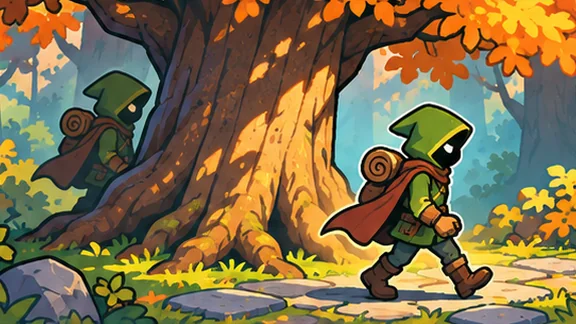
Walk around the tree with sorting on. Watch the feet to find the point where the trunk starts to cover the character.
Interactive demo#TilesAndWorlds
Drawing things lower on the screen later, so they appear in front.
In a top-down game, something further down the screen is closer to you. Sort everything by the y of its feet and the character walks behind the tree, then in front of it, with no extra work. Turn it off and the character is always on top.
Code
namespace y_sort_lesson;
import stage;
import std;
import math;

fn draw_tree() {
    ell(80, 60, 12, 4, "rgba(14,15,38,.35)");
    tree(80, 60, 2);
}
fn draw_actor(x: f64, y: f64, t: f64) {
    ell(x, y, 9, 3, "rgba(14,15,38,.35)");
    actor(x, y, walk(t), 2, "base", "plain", sin(t) > 0);
}

export "y-sort" fn draw(time: f64, dt: f64, px: f64, py: f64, hover: bool) {
    let enabled = toggle("on");
    let x = if hover { px } else { 80 + cos(time) * 34 };
    let y = if hover { py + 12 } else { 60 + sin(time) * 18 };
    artwork("clearing");
    if enabled && y < 60 {
        draw_actor(x, y, time);
        draw_tree();
    } else {
        draw_tree();
        draw_actor(x, y, time);
    }
    if enabled {
        line(60, 60.5, 100, 60.5, MAG, 2, 2);
        rect(x - 3, y, 7, 1, MAG);
    }
}
Comments
No comments yet.