
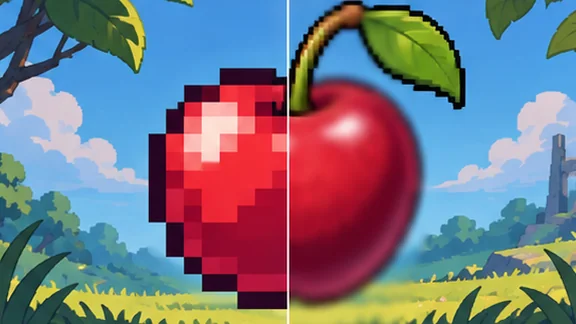
Texture filtering
Pause and compare the edge of the same foot on both sides. Where do the intermediate colours appear?
#PixelLookF-ZEROCRT displaysPS1 era
How the game fills in pixels when an image is drawn bigger than it was made.
Nearest-neighbour copies each pixel into a crisp block, which is what pixel art wants. Linear filtering blends neighbouring pixels, which suits photos but turns pixel art to mush. If your pixel art looks blurry, this setting is almost always why.
Code
namespace texture_filtering_lesson;
import stage;
import std;
import math;

export "texture-filtering" fn draw(time: f64, dt: f64, px: f64, py: f64, hover: bool) {
    artwork("draft");
    let frame = (time * 3) as i64 % 4;
    image(frame, 10, 20, 5);
    smooth(true);
    image(frame, 90, 20, 5);
    smooth(false);
    line(80.5, 8, 80.5, 92, LINE, 2, 2);
}
Comments
No comments yet.