
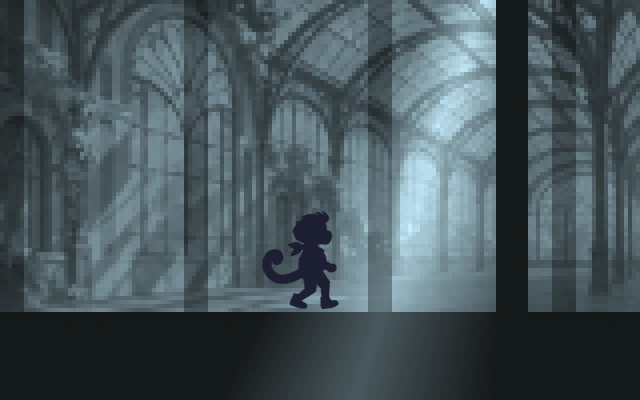
Lighting a silhouette


Can you make the figure stand out against the wall without increasing its fill light?
Interactive demo#LightAndGlowINSIDE3D lighting
Place a pool of light behind a dark figure to make its pose readable in a dark room.
In this INSIDE-inspired study a slanted band lights the haze behind a figure. The columns interrupt the band, and a separate fill value controls the foreground. Slide the shaft past the head, pause, then lift the fill. Watch for the moment the head blends into the wall.
Code
namespace silhouette_lighting_lesson;
import stage;
import std;
import math;

var pixels: u8[64000] = [0;64000];

export "silhouette-lighting" fn draw(time: f64, dt: f64, px: f64, py: f64, hover: bool) {
    load_texture("hall");
    let fill = number_control("fill", 0.12);
    let beam_x = if hover { px } else { 86 + 26 * sin(time * 0.5) };
    for y in 100 {
        for x in 160 {
            let shaft = max(0.0, 1.0 - abs(x - beam_x + (y - 45) * 0.32) / (11 + y * 0.24));
            let iron = texel(x, y);
            var light = (iron[1] / 255.0) * 0.8 + shaft * 0.5 + 0.07;
            if x % 46 < 6 { light *= 0.67; }
            if y >= 78 { light = 0.12 + shaft * 0.32; }
            if x > 123 && x < 132 { light = 0.055 + fill * 0.62; }
            put_rgb(pixels[..], x, y, 167 * light, 201 * light, 214 * light);
        }
    }
    pixel_buffer(pixels[..], 160, 100);
    actor(77, 78, 0, 2.2, "shade");
    opacity(fill * 0.54);
    actor(77, 78, 0, 2.2, "white");
    opacity(1);
}
Comments
No comments yet.