
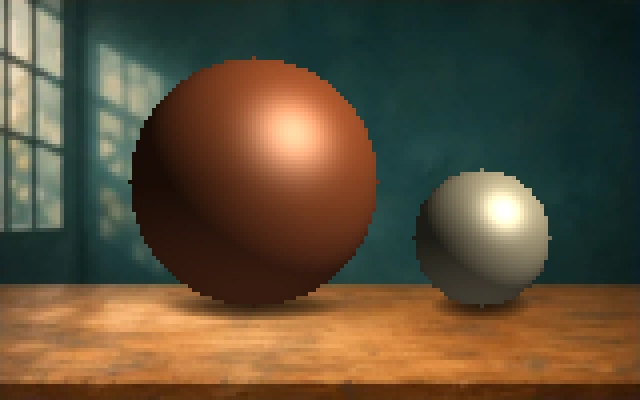
Surface roughness and highlights


Pause the lamp and raise roughness. Watch the width and brightness of the highlight separately.
Interactive demo#LightAndGlow3D lighting
A polished surface gives a small, sharp highlight. A rough finish spreads the reflection over a larger area.
On each sphere, compare the surface normal with the direction halfway between the light and the viewer. Raising their dot product to a high power makes only a narrow cap reflect brightly. This Blinn-style approximation lets you study the shape of a highlight with one control.
Code
namespace material_roughness_lesson;
import stage;
import std;
import math;

var pixels: u8[64000] = [0;64000];

export "material-roughness" fn draw(time: f64, dt: f64, px: f64, py: f64, hover: bool) {
    load_texture("studio");
    let roughness = number_control("roughness", 0.32);
    let lx = if hover { (px - 80) / 70 } else { 0.8 * sin(time * 0.55) };
    let light_len = sqrt(lx * lx + 1.0);
    let hx = lx / light_len;
    let hy = 0.8 / light_len;
    let hz = 0.6 / light_len + 1.0;
    let half_len = sqrt(hx * hx + hy * hy + hz * hz);
    let exponent = 2.0 / (roughness * roughness) - 2.0;
    for y in 100 {
        for x in 160 {
            let n = sphere_surface(x, y);
            if n.radius == 0 {
                let backdrop = studio_colour(x, y);
                put_rgb(pixels[..], x, y, backdrop[0], backdrop[1], backdrop[2]);
                continue;
            }
            // Blinn highlight around the half-vector between light and viewer.
            let diffuse = max(0.0, (n.nx * lx + n.ny * 0.8 + n.nz * 0.6) / light_len);
            let nh = max(0.0, (n.nx * hx + n.ny * hy + n.nz * hz) / half_len);
            let spec = pow(nh, exponent) * (1.0 - roughness * 0.75);
            let base = if n.radius > 20 { [191.0, 95.0, 49.0] } else { [224.0, 208.0, 165.0] };
            let bounce = max(0.0, -n.ny) * (0.14 + 0.09 * n.nz);
            let v = 0.13 + 0.78 * diffuse + bounce;
            put_rgb(pixels[..], x, y, base[0] * v + spec * 196, base[1] * v + spec * 188,
                base[2] * v + 12 * bounce + spec * 168);
        }
    }
    pixel_buffer(pixels[..], 160, 100);
}
Comments
No comments yet.