
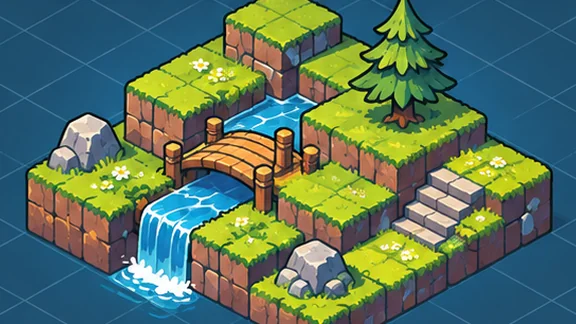
Isometric
Step along one row of diamonds. Which way does the character travel on screen?
Interactive demo#TilesAndWorlds
A tilted view where square tiles are drawn as diamonds.
The world is still a plain grid; it’s only drawn at an angle so you see the tops and two sides of things. The maths converts between grid cells and diamond positions on screen.
Code
namespace isometric_lesson;
import stage;
import std;
import math;

fn diamond(x: f64, y: f64, color: const u8[:]) {
    quad(x, y, x + 11, y + 5.5, x, y + 11, x - 11, y + 5.5, color);
}

export "isometric" fn draw(time: f64, dt: f64, px: f64, py: f64, hover: bool) {
    artwork("draft");
    let u = (px - 80) / 11.0;
    let v = (py - 16) / 5.5;
    let hi = clamp(floor((u + v) / 2.0), 0.0, 5.0);
    let hj = clamp(floor((v - u) / 2.0), 0.0, 5.0);
    for j in 6 {
        for i in 6 {
            let x = 80 + (i - j) * 11;
            let y = 16 + (i + j) * 5.5;
            let selected = i == hi && j == hj;
            // Project a square paving texture onto the two receding axes.
            save();
            matrix(11.0 / 8, 5.5 / 8, -11.0 / 8, 5.5 / 8, x, y);
            tile_image(2, 0, 0, 1);
            restore();
            if selected { diamond(x, y, "rgba(255,43,214,0.74)"); }
            else if (i + j) % 2 == 1 { diamond(x, y, "rgba(25,54,67,0.28)"); }
            if i == 4 && j == 1 {
                quad(x - 11, y - 4.5, x, y + 1, x, y + 11, x - 11, y + 5.5, STONE2);
                quad(x + 11, y - 4.5, x, y + 1, x, y + 11, x + 11, y + 5.5, "#55597f");
                diamond(x, y - 10, STONE);
            }
            if selected {
                image(0, x - 6, y - 5.5, 1);
            }
        }
    }
}
Comments
No comments yet.