
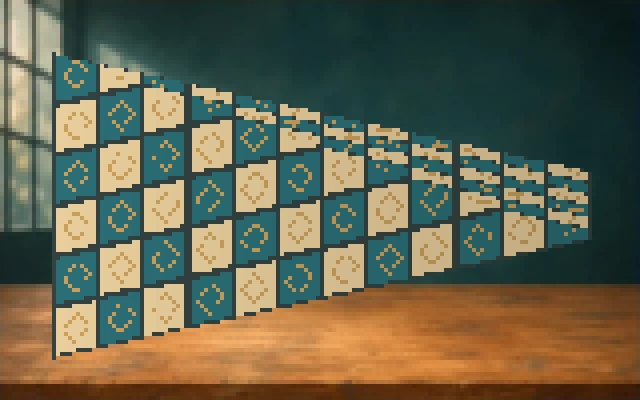
Affine texture warp


Tilt the wall and watch its diagonal. Which interpolation keeps the checks lined up?
Interactive demo#PixelLookPS1 era
A textured wall can appear to bend when texture coordinates are interpolated directly across its projected triangles.
The wall has a near edge and a far edge. Interpolate UV coordinates in screen space and the checker pattern kinks along the diagonal between the triangles. Enable perspective correction to weight samples by reciprocal depth. Both modes draw the same silhouette.
Code
namespace affine_texturing_lesson;
import stage;
import std;
import math;

var pixels: u8[64000] = [0;64000];

export "affine-texturing" fn draw(time: f64, dt: f64, px: f64, py: f64, hover: bool) {
    load_texture("studio");
    let correct = toggle("perspective");
    let near_z = 1.0;
    let far_z = if hover { 1.2 + px / 44 } else { 3.5 + sin(time * 0.65) };
    for y in 100 {
        for x in 160 {
            // A receding wall. Its left and right edges have different camera depths.
            let u_screen = (x - 13) / 134.0;
            let inv_z = (1 - u_screen) / near_z + u_screen / far_z;
            let height = 76 * inv_z;
            let v = 0.5 + (y - 51) / max(1.0, height);
            if u_screen < 0 || u_screen > 1 || v < 0 || v > 1 {
                let bg = texel(x, y);
                put_rgb(pixels[..], x, y, bg[0], bg[1], bg[2]);
                continue;
            }
            // Interpolate UVs across the two projected triangles.
            let sy = (y - 51 + height * 0.5) / 76;
            let u = if correct { u_screen / far_z / inv_z } else { u_screen };
            let affine_v = if sy <= u_screen / far_z { sy * far_z } else { sy + u_screen * (1 - 1 / far_z) };
            let texture_v = if correct { v } else { affine_v };
            let tile = ((floor(u * 12) + floor(texture_v * 6)) as i64) % 2;
            let tx = u * 12 - floor(u * 12);
            let ty = texture_v * 6 - floor(texture_v * 6);
            let seam = min(min(tx, 1 - tx), min(ty, 1 - ty));
            let diamond = abs(tx - 0.5) + abs(ty - 0.5);
            let pigment = if seam < 0.055 { [52.0, 66.0, 65.0] }
                else if abs(diamond - 0.29) < 0.035 { [204.0, 160.0, 91.0] }
                else if tile == 0 { [44.0, 111.0, 118.0] } else { [234.0, 207.0, 157.0] };
            let light = 0.77 + inv_z * 0.23;
            put_rgb(pixels[..], x, y, pigment[0] * light, pigment[1] * light, pigment[2] * light);
        }
    }
    pixel_buffer(pixels[..], 160, 100);
}
Comments
No comments yet.